All this is made possible by a feature known as Google Friend Connect. Here's what mine looks like. You can also see it in the sidebar on the right.

At one time, every new blog created in Blogger automatically included this gadget, so it was easy to attract followers. But times have changed. Google+ has replaced Google Friend Connect, and GFC is slowly being phased out. It often doesn't work properly, and the Google engineers aren't too concerned about fixing the glitches. Still, it's a very handy gadget, and an excellent alternative for those of us who don't want to use Google+. The replacement gadget - Google+ Followers - is only for Google+ accounts, and many of us don't want to make the switch to Google+.
So why don't new bloggers (or old bloggers with new blogs) simply add the gadget themselves?

Good question. The answer is, it's hard to find. In an attempt to force people to use Google+ Followers instead, the clever engineers have made it seem that the old Followers gadget is no longer an option. You may go to your layout, click Add a Gadget, and come up empty-handed. But don't despair. If you promise not to tell Google that you heard it here, I'll let you in on the secret.
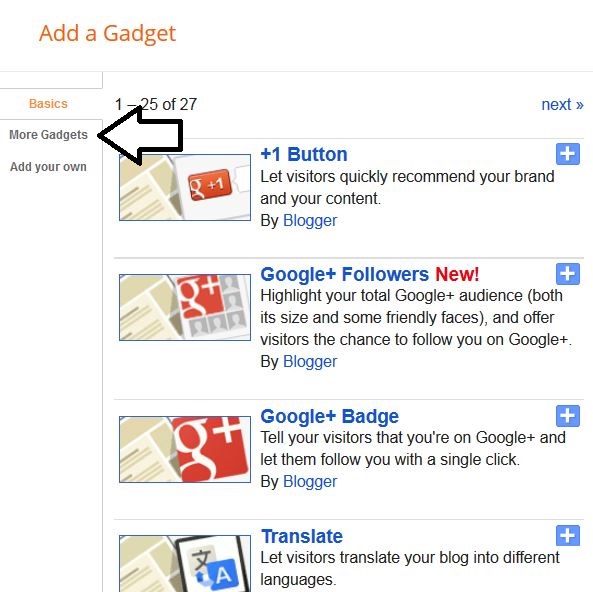
When you try to add a gadget, and scroll through all the possible gadgets, you won't see Followers. But if you click on More Gadgets in the upper left, guess what?


Now sit back and watch the number of your followers increase each day. It works for both Google+ and regular Google, as well as Yahoo, Twitter, OpenID, Netlog and AIM accounts.


 Posts
Posts